







April 16, 2008
RedEyeBot Update
Version 1.0.1 resolves some compatibility issues on Windows Vista. If you had problems using the product on Vista, please upgrade.
April 4, 2008
FirmTools RedEyeBot Now Shipping
Remove red-eye automatically from a bunch of digital pictures! FirmTools RedEyeBot scans your entire collection of digital photos or any part of it, detecting and removing red-eye completely automatically. Like the original better? You always have the option to roll-back any image to its original state.
April 4, 2008
RedEyeBot : Special Introductory Pricing
FirmTools is offering RedEyeBot at a special introductory price of US $19.95 through May 04th, 2008. Save 30% off the regular price Now!.
  |
Automatic Red-Eye RemovalRemove red-eye automatically from a bunch of digital pictures! FirmTools RedEye Bot scans your entire collection of digital photos or any part of it, detecting and removing red-eye completely automatically. Like the original better? You always have the option to roll-back any image to its original state.
  |

Highlights
The Red-Eye Effect
The red-eye effect appears on film and digital photographs when you take a picture of a human face in the dark with a built-in flash. The flash works too fast for the pupil to close, causing the bright red reflection deep inside of an eye. People with red-eye appear on photographs to have unnatural, demonic eyes. Removing the red-eye effect greatly enhances the appearance of faces in pictures.
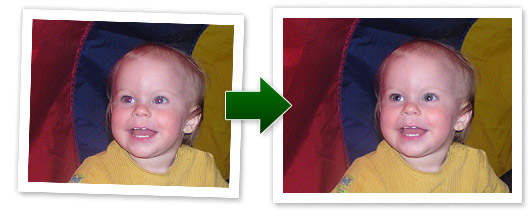
Fully Automatic Red-Eye Reduction
It's no fun opening and editing each and every digital picture manually from the hundreds of images you've shot with a flash. There are various tools on the market that claim to reduce the red-eye effect, but the majority of these tools require that you open images one by one and select the areas that suffer from the red-eye effect.
FirmTools RedEyeBot removes the hassle of manual red-eye reduction once and forever! Processing hundreds of photographs is just a matter of minutes thanks to the ability of FirmTools RedEyeBot to detect human faces and red eyes.
Batch Mode
Process all of your images at once, specify folders or select a set of images for reducing the red-eye effect. FirmTools RedEyeBot will process your selection quickly and efficiently no matter how many images you select!
Full Backup
Every once in a while the original photograph makes you happier than the corrected one. Even though this does not frequently happen, FirmTools RedEyeBot backs up each processed image for easy one-click restoration. If you're not completely happy with the result, just click a button and return the original image!
Manual Mode
Occasionally you might want to work on a picture in an assisted-automatic or even a fully-manual mode. RedEyeBot provides you an easy way to remove the red-eye effect by defining the area that contains the red eyes. After you do this, it processes your selection and removes the red-eye within it automatically.
System requirements
- Microsoft Windows 2000, Windows XP (Recommended), Windows 2003 Server or Windows Vista;
- Pentium or AMD CPU 1GHz (Recommended: 2GHz or greater);
- 512 MB RAM (Recommended: 1GB or greater);
- 10 MB hard drive space available.